Transform Your Digital Art with 20 Leaf Brush Stamps for Procreate
In the rapidly evolving world of digital illustration, efficiency and texture often go hand in hand. For artists using the iPad and the powerful Procreate application, the ability to create lush, organic environments quickly is a game-changer. This is where specialized tools like the 20 Leaf Brush Stamps come into play. These brushes are not merely simple icons; they are sophisticated assets designed to streamline your creative workflow, allowing you to populate scenes with botanical details in seconds rather than minutes.
Whether you are a seasoned concept artist designing a fantasy forest or a beginner trying to add a touch of nature to a journal page, understanding how to leverage these stamp brushes can elevate the quality of your work significantly. This guide will walk you through everything you need to know about this specific set, from installation to advanced usage techniques, ensuring you get the most out of your digital toolkit.
The Power of Stamp Brushes in Digital Botanical Art
To understand the value of the 20 Leaf Brush Stamps, we must first appreciate the role of stamp brushes in modern digital art. Unlike traditional drawing brushes that require complex stroke mechanics to build up form, stamp brushes apply a pre-defined image every time you tap the screen. This "stamp" functionality is incredibly versatile. It allows for rapid repetition of elements, which is essential when creating textures like foliage, crowds, or patterned backgrounds.
In the context of botanical illustration, painting individual leaves one by one can be tedious and time-consuming. With a set of twenty distinct leaf shapes, you gain an immediate library of assets. You can mix and match different species, sizes, and orientations to create a convincing canopy without ever leaving the comfort of your tablet. This approach fits perfectly into the modern creative workflow, where speed and iteration are just as important as precision.
Why This Specific Set Matters
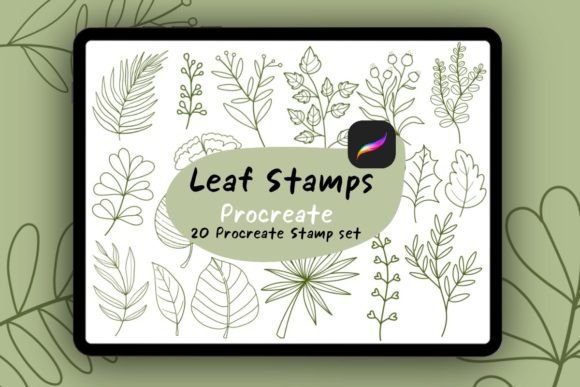
This particular collection includes 20 unique leaf brush stamps, offering a variety of shapes and styles suitable for different artistic needs. The simplicity of the design ensures that they remain fast to use, while the variety prevents your artwork from looking repetitive or artificial. By having a diverse palette of leaf shapes at your fingertips, you can achieve a naturalistic look that mimics the randomness found in real-world forests and gardens.
Furthermore, these brushes are optimized specifically for Procreate. They are built to integrate seamlessly with the app's engine, ensuring smooth performance even on older iPad models. This compatibility is crucial because it means you won't experience lag or rendering issues while working on large canvases filled with thousands of stamped elements.
Step-by-Step Installation Guide
One of the most common hurdles for new users is the installation process. While importing third-party brushes into Procreate is straightforward, following the correct steps ensures that your files are organized and ready for immediate use. Here is a clear, logical guide to getting your 20 Leaf Brush Stamps onto your device.
- Prepare Your File: Before opening Procreate, ensure you have downloaded the brush set file. If the file is compressed (usually in a .zip format), you must unzip it first. On your iPad, open the Files app, locate the download, and tap it to extract the contents. You should see a file ending in
.brushset. - Open Procreate: Launch the Procreate application on your iPad. Ensure you are on the main gallery screen where your projects are listed.
- Import the Brushes: Tap the wrench icon (Actions) in the top left corner, then select the "Brushes" tab. In the bottom right corner of the brush library, you will see three dots (...). Tap these dots and select "Import." Alternatively, you can simply tap the
.brushsetfile directly from your Files app, which will automatically prompt Procreate to import the set. - Verify Installation: Once imported, scroll down in your brush library. You should see a new folder named something similar to "Leaf Stamps" or the name provided in the file. Open this folder to confirm that all 20 brushes are present and accessible.
It is important to note that this process works exclusively within the Procreate ecosystem. These files cannot be used in other applications like Adobe Fresco or Photoshop unless converted, so keep this limitation in mind if you plan to switch software later.
How to Use Leaf Stamps Effectively
Once installed, the creative possibilities are vast. Using the 20 Leaf Brush Stamps is intuitive, but mastering them requires a bit of experimentation. Here is how you can start creating beautiful designs immediately.
Basic Application
After selecting one of the leaf stamps from your newly imported folder, simply tap the screen to place a leaf. That's it! Each tap places a crisp, high-resolution stamp. You can layer multiple taps to create clusters of foliage. The beauty of this method is its speed; what might take ten minutes to paint manually can be achieved in thirty seconds.
Customization Techniques
While the stamps provide a base shape, their true power lies in customization. To avoid a "sticker-like" appearance, you should manipulate several settings:
- Scaling and Resizing: One of the most critical features of these brushes is the ability to scale. Use the two-finger pinch gesture on your canvas to resize the brush before tapping. Varying the size of your leaves creates depth and perspective. Larger leaves in the foreground and smaller ones in the background simulate distance naturally.
- Color Variation: Nature is rarely monochromatic. Change your color swatch frequently between taps. Mix shades of green, yellow, brown, and even hints of red to mimic seasonal changes or lighting conditions. You can also use the "Dynamic Color" settings in Procreate to randomize the hue slightly with each stamp.
- Opacity and Blending: Adjust the opacity slider to make some leaves appear more translucent, as if they are further away or backlit by the sun. Experiment with blending modes like "Multiply" or "Overlay" to help the leaves integrate better with the background layers.
- Rotation: Don't forget to rotate your brush. Most stamp brushes allow for rotation gestures. Randomizing the angle of each leaf prevents the design from looking too rigid or mechanical.
Practical Applications in Modern Creativity
The utility of these leaf brush stamps extends far beyond simple hobbyist doodling. They are valuable tools across various sectors of creativity and business.
Digital Illustration and Storytelling
For illustrators working on children's books or graphic novels, establishing setting is key. A quick background of dense foliage can instantly transport the reader to a magical forest. The speed of these stamps allows artists to focus more on character expression and composition rather than getting bogged down in textural details.
Graphic Design and Branding
In the realm of graphic design, organic elements are increasingly popular for branding, especially in industries related to wellness, sustainability, and food. Designers can use these stamps to create unique patterns for packaging, website backgrounds, or social media graphics. The clean vector-like quality of many stamp brushes makes them scalable for print as well.
Education and Skill Building
For students learning digital art, these brushes serve as an excellent educational tool. They demonstrate the concept of asset reuse and procedural generation. By studying how to arrange these pre-made elements, learners can understand principles of composition, balance, and visual rhythm without needing advanced freehand drawing skills initially.
Common Misunderstandings and Tips
Despite their ease of use, there are a few misconceptions about stamp brushes that beginners often encounter.
Misconception 1: "Stamps look fake."
While poorly executed stamping can look artificial, this is usually due to a lack of variation. If every leaf is the same size, color, and angle, it will indeed look like a pattern. The solution is to embrace chaos. Randomize your placement, vary your colors heavily, and overlap elements to create a sense of natural disorder.
Misconception 2: "I don't need to learn to draw leaves."
While stamps save time, they do not replace the need for foundational knowledge. Understanding how light hits a leaf, how shadows fall, and how branches grow will help you place your stamps more effectively. Use the stamps as a supplement to your skills, not a replacement for observation.
Misconception 3: "These only work on white backgrounds."
These brushes work on any layer. You can place them over watercolor washes, dark night skies, or abstract textures. Using layer masks and clipping masks can further integrate the stamps into complex compositions.
Conclusion: Elevate Your Workflow Today
The 20 Leaf Brush Stamps for Procreate represent a perfect intersection of convenience and artistic potential. By simplifying the creation of complex textures, they empower artists to spend more time on the big picture and less on repetitive tasks. Whether you are designing a logo, illustrating a story, or simply exploring your creativity on an afternoon break, these tools offer a robust way to bring nature into your digital workspace.
Remember, the technology is only as good as the artist wielding it. Take the time to experiment with scaling, coloring, and layering. Download the set, import it carefully, and let your imagination run wild. With these 20 versatile stamps, the only limit is your own creativity. Start tapping today and watch your digital landscapes come alive.