Fairy Garden Procreate Color Palette: A Digital Artist's Essential
In the vast ecosystem of digital art, the choice of colors often dictates the mood, atmosphere, and emotional resonance of a piece. For artists working on Apple devices, finding a curated selection that balances whimsy with professional utility can be a challenge. The Fairy Garden Procreate Color Palette emerges as a solution for those seeking a harmonious blend of soft pastels and grounding earth tones. This instant digital download is designed specifically for the Procreate app on iPad, iPad Pro, and iPhone, offering a versatile toolkit for creators across various disciplines.
The Essence of the Fairy Garden Aesthetic
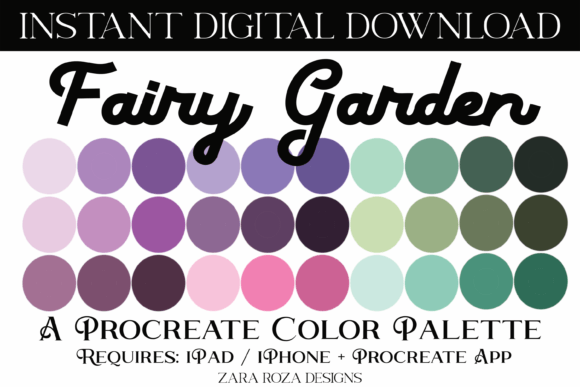
The Fairy Garden Procreate Color Palette is not merely a collection of random hues; it is a carefully constructed library of 30 distinct swatches designed to evoke a specific feeling. The palette leans heavily into a calm, pastel aesthetic while integrating necessary dark and light contrasts to create depth. The color story weaves together gradient purple, pink, green, and brown tones, mimicking the natural beauty of a hidden woodland or an enchanted garden.
These shades are particularly effective because they avoid the harshness often found in standard digital presets. Instead, they offer a sophisticated range of greens reminiscent of moss and ferns, pinks that suggest blooming flowers, and purples that hint at twilight magic. The inclusion of earthy browns ensures that the artwork remains grounded, preventing it from looking too ethereal or disconnected from reality. This balance makes the palette ideal for projects requiring both a dreamlike quality and structural integrity.
Technical Specifications and Compatibility
One of the primary advantages of this resource is its seamless integration into the existing workflow of mobile artists. The product comes as a single .swatches file, which is the native format for the Procreate application. This means there is no need for complex conversion tools or third-party software. Whether you are using a powerful iPad Pro with an Apple Pencil or a compact iPhone running Procreate Pocket, the file is ready to use immediately upon import.
The "Instant Digital Download" aspect ensures that creators do not face shipping delays. Once purchased, the file is available for immediate transfer to your device. This efficiency is crucial for professionals who are working against tight deadlines or hobbyists who want to start creating right away. The file contains exactly 30 swatches, a number that strikes a perfect balance between variety and manageability, allowing artists to explore combinations without being overwhelmed by choice paralysis.
Real-World Applications Across Industries
The versatility of the Fairy Garden Procreate Color Palette extends far beyond simple illustration. Its broad spectrum of tones makes it applicable to a wide array of creative fields:
- Digital Illustration and Character Design: Artists creating anime, manga, comics, or chibi characters will find the skin tone variations and clothing colors within the palette highly useful. The soft gradients work exceptionally well for shading faces and adding volume to hair.
- Makeup and Fashion Artistry: Digital makeup artists and fashion illustrators can utilize the pastel pinks and purples for bridal looks, while the earthy tones provide excellent options for natural hair coloring and rustic fashion sketches.
- Event Planning and Invitations: The palette is perfectly suited for designing wedding invitations, bridal shower cards, and bachelorette party themes. The romantic yet natural vibe fits seamlessly into boho, rustic, and floral event aesthetics.
- Seasonal and Holiday Projects: While rooted in nature, the colors are adaptable for festive occasions. The greens and browns transition easily into Christmas and Thanksgiving themes, while the lighter pinks and purples can be adjusted for Easter, Valentine's Day, or spring baby showers.
- Hand Lettering and Typography: Calligraphers and hand-lettering enthusiasts can use these swatches to create textured backgrounds or multi-colored lettering that feels organic and inviting.
Importing Your New Palette: A Step-by-Step Guide
To fully leverage the benefits of the Fairy Garden Procreate Color Palette, users must correctly import the file into their device. The process is straightforward but requires attention to detail to ensure the swatches appear in your library. Follow this guide to get started:
- Locate the File: Navigate to your "Downloads" folder on your iPad or iPhone. If you saved the file elsewhere, go to that specific location. You are looking for the file ending in
.swatches. - Initiate Import: Press firmly on the
.swatchesfile. iOS is designed to recognize this file type and should automatically prompt you to open it with Procreate. - Confirm Transfer: Your device should launch the Procreate app automatically. Look for a notification indicating that the file is importing. You will typically see a blue tick under the text "importing," confirming that the data has been successfully transferred.
- Access in Procreate: Open your current project or create a new one. Tap the color wheel icon to open the color menu, then tap the two overlapping circles icon to access your Palettes tab.
- Find Your Swatches: Scroll down to the bottom of your palette list. Your newly imported "Fairy Garden" palette should appear there, ready for selection.
If the automatic import does not trigger, you may need to use the "Share" sheet to select Procreate manually, though the direct tap method works for most users. Once inside, you can rename the palette or organize it alongside your other favorite collections.
Evaluating Suitability for Your Project
While the Fairy Garden Procreate Color Palette is incredibly versatile, understanding its strengths and limitations helps in evaluating whether it fits a specific project. The palette excels in scenarios requiring a soft, approachable, and natural look. It is particularly strong for projects targeting audiences interested in wellness, nature, romance, or childhood nostalgia.
However, artists working on high-contrast, cyberpunk, or industrial themes might find the palette less suitable without significant modification. The inherent softness of the pastels means that achieving stark, aggressive visuals would require blending these colors with external, darker values not included in the set. Additionally, while the palette covers a wide range of "nature" tones, it is not a substitute for a full CMYK or RGB reference chart for print production. It is best used as a creative starting point rather than a final color specification for commercial printing.
Enhancing Creativity with Intentional Color Choices
Using a pre-made palette like this one can actually boost creativity by removing the friction of color theory decision-making. When an artist spends less time trying to decide which shade of green matches a specific leaf, they can focus more on composition, brushwork, and storytelling. The Fairy Garden Procreate Color Palette acts as a constraint that fosters innovation, encouraging artists to mix and match the provided 30 swatches in unexpected ways.
For instance, combining the deep browns with the lightest pastels can create a dramatic chiaroscuro effect, while layering the purples and pinks can produce a sunset-like glow. The gradient capabilities of the swatches allow for smooth transitions that mimic the natural world, essential for realistic rendering or stylized digital painting. Whether you are sketching a quick concept for a birthday party design or developing a detailed character for a comic book, having a cohesive color scheme at your fingertips streamlines the entire creative process.
Ultimately, the value of this digital asset lies in its ability to bring a consistent, beautiful aesthetic to diverse projects. From the intricate details of a digital planner decor to the bold strokes of a wedding invitation, the Fairy Garden Procreate Color Palette provides a reliable foundation for artistic expression. By downloading and importing this tool, creators equip themselves with a versatile resource that supports both technical precision and imaginative freedom. Happy drawing!