Chilly Castle Procreate Color Palette Guide
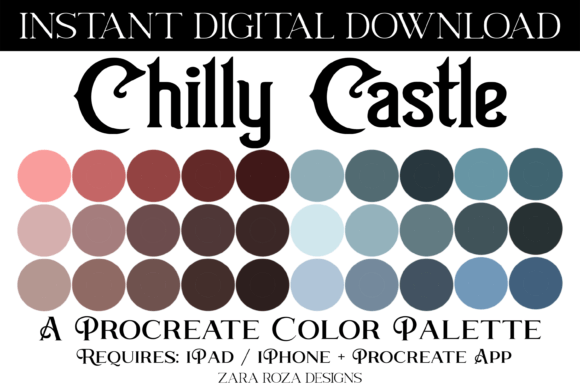
Digital artists often spend more time selecting colors than actually drawing. The right collection of hues can transform a rough sketch into a polished illustration, while the wrong ones can leave even the most detailed artwork feeling flat. The Chilly Castle Procreate Color Palette addresses this common creative hurdle by offering a curated selection of thirty distinct swatches designed specifically for the iPad ecosystem. This instant digital download provides a versatile foundation for everything from soft pastel backgrounds to rich, earthy accents, streamlining the workflow for users across various skill levels.
Understanding the Chilly Castle Collection
The core value of this palette lies in its thoughtful composition. Unlike random color generators, the Chilly Castle set is built around a cohesive aesthetic that balances cool and warm tones. It features a spectrum ranging from bright light blues, teals, and turquoise sky clouds to deep dark gradients. These cool tones are perfectly counterbalanced by organic warmth found in wood browns, beige, cinnamon, terracotta, and ombre reds. This specific combination allows for natural transitions between atmospheric elements like skies and water, and grounded elements like landscapes or character skin tones.
For those new to digital art, the inclusion of thirty pre-selected swatches removes the paralysis of choice. Instead of staring at an infinite color wheel, beginners have a structured starting point that guarantees harmony. The file format is a single .swatches file, which is native to the Procreate app on iPad, iPhone, and iPad Pro. This ensures that once imported, the colors are instantly accessible via the Apple Pencil interface, ready for immediate application in hand lettering, illustration, or painting projects.
Why Different Creators Value This Palette
The utility of the Chilly Castle Procreate Color Palette shifts depending on who is using it and what they aim to achieve. A professional illustrator might view it as a time-saving asset for client work, while a hobbyist might see it as a tool to learn color theory through practice. Understanding these nuances helps determine if this resource aligns with your specific creative goals.
For Beginners and Hobbyists
Newcomers to the Procreate app often struggle with creating custom palettes from scratch. The learning curve involves understanding how to mix colors, manage opacity, and ensure contrast without clashing. For this audience, the primary benefit is ease of use. The palette acts as a guided tutorial in disguise; by using these pre-matched colors, beginners naturally produce aesthetically pleasing results. Whether you are designing birthday party cards, baby shower invitations, or simple doodles for social media, having a reliable set of soft pastels and bright lights reduces frustration and encourages experimentation.
Hobbyists focusing on digital scrapbooking or journaling in apps like Goodnotes, Notability, or Noteshelf also find immense value here. The inclusion of neutral greys, cloud whites, and warm beiges makes it easy to create clean layouts for notes or personal memories without needing advanced design skills.
For Professionals and Freelancers
For established artists and small business owners, time is currency. The priority here shifts to speed and commercial value. When working on tight deadlines for holiday commissions—such as Christmas, Halloween, Easter, or Valentine's Day designs—having a palette that already contains festive yet sophisticated tones like terracotta, cinnamon, and teal can significantly accelerate the rendering process. Professionals can focus on composition and storytelling rather than color mixing.
Furthermore, the versatility of the palette supports diverse project types. A freelancer might use the cool blue and green gradients for a corporate poster one day and switch to the warm wood brown and red ombre tones for a wedding invitation suite the next. The ability to pivot quickly between different moods using a single file enhances workflow efficiency.
For Educators and Students
In an educational setting, the Chilly Castle collection serves as a practical teaching aid. Educators can use it to demonstrate how complementary colors interact, such as pairing the turquoise sky tones with the terracotta earth tones. For students, it offers a safe environment to explore texture and layering. Because the colors are balanced, students can focus on technique—like blending with the Apple Pencil or using specific digital brushes—without worrying that their color choices will ruin the piece.
Practical Applications Across Occasions
The true test of any color scheme is its adaptability. The Chilly Castle Procreate Color Palette is designed to handle a wide array of themes. The soft pastel and bright light sections are ideal for spring celebrations like Easter or bridal showers, evoking a sense of freshness and joy. Conversely, the darker gradients and rich browns provide the depth needed for autumnal themes like Thanksgiving or the spooky elegance of Halloween.
Beyond seasonal events, the palette excels in portrait art. The range of natural custom hair color tones, combined with skin-friendly beiges and terracottas, allows artists to render realistic characters. The cool greys and sky blues add dimension to clothing and backgrounds, ensuring the subject stands out. For those creating printable art prints or posters, the high-contrast options within the thirty swatches ensure that the final output remains vibrant whether viewed on an iPad screen or printed on paper.
How to Import Your New Palette
Getting started with the Chilly Castle collection is straightforward, provided you have the Procreate app installed on your compatible device. The file is delivered as an instant digital download, meaning there is no physical shipping involved. Once you have purchased and downloaded the .swatches file, follow these steps to integrate it into your workspace:
- Navigate to the "Downloads" folder on your iPad or the specific location where you saved the file.
- Tap directly on the .swatches file.
- If prompted, select "Open in Procreate." If the app does not open automatically, long-press the file, choose "Share," and then select "Copy to Procreate."
- Once inside Procreate, tap the "Actions" wrench icon, go to "Canvas," and select "Import Swatch Library" to finalize the installation.
After importing, the palette will appear in your color drawer, ready for immediate use. You can now access the full range of blue, green, teal, grey, red, and brown tones with a single tap.
Evaluating Fit for Your Needs
Before deciding to use the Chilly Castle Procreate Color Palette, consider your current workflow. If you frequently find yourself stuck on color selection or need a quick solution for client projects, this tool offers significant value. It is particularly well-suited for those who appreciate a blend of modern digital aesthetics with traditional earthy tones. However, if your work requires highly specialized, monochromatic schemes or neon cyberpunk styles, you may need to supplement this palette with additional resources.
Ultimately, the decision comes down to whether you value a curated, harmonious set of colors that covers a broad spectrum of needs. For adults aged 20 to 50 looking to enhance their digital planning, artistic output, or business offerings, this palette provides a reliable foundation. It bridges the gap between technical capability and creative vision, allowing you to focus on what matters most: bringing your ideas to life.